

Enterprise teams can access powerful generative AI tools within minutes. The harder decision is whether a standard product can support the workflow safely, or whether the business needs a solution designed around its own data, systems, permissions, and quality requirements.
This is not a simple choice between buying software and building everything from scratch. In practice, organizations have three operating models: adopt an off-the-shelf tool, develop a custom solution, or combine an existing model with proprietary data and controls in a hybrid architecture. The right choice depends on the risk of the use case, workflow specificity, time to value, internal capabilities, and total cost of ownership.
This guide focuses on that operating-model decision. Business leaders who are still comparing individual products can first review the most used generative AI tools in 2026.

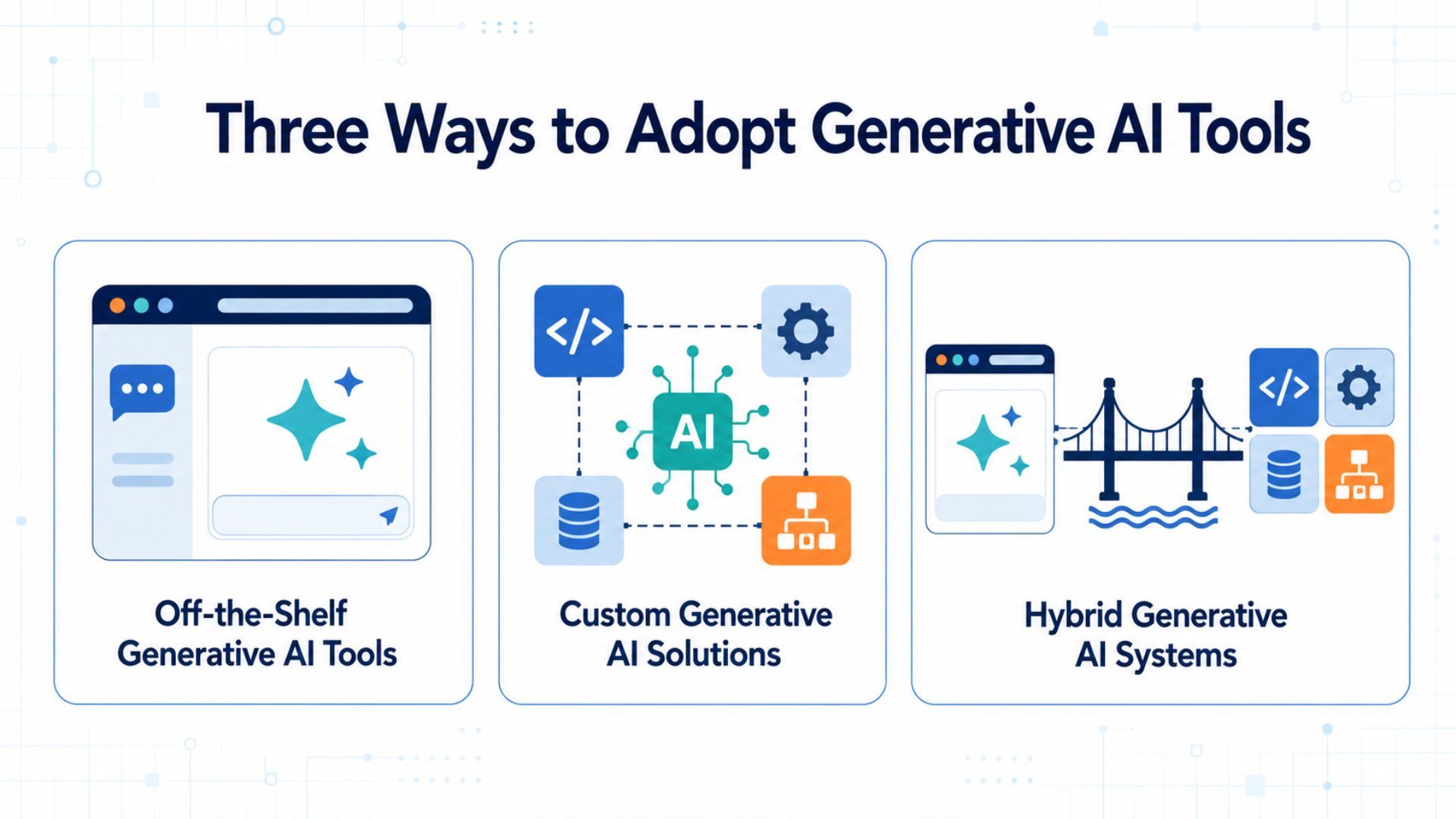
Three Ways to Adopt Generative AI Tools
The label “custom AI” is often misunderstood. Most enterprises do not need to train a foundation model. They can create differentiated applications by controlling the layers around an existing model.
Off-the-Shelf Generative AI Tools
An off-the-shelf tool is a finished product that users access through a standard web, desktop, or mobile interface. Common capabilities include writing, summarization, document analysis, research, coding, and image creation. Enterprise editions may add identity management, administrative controls, data protections, and workspace features.
This model is strongest when the task is common across many organizations and does not require deep integration with proprietary systems. Its main advantage is speed. The vendor operates the underlying product, releases model updates, and maintains the infrastructure.
The trade-off is that the business works within the vendor’s interface, configuration options, and commercial roadmap.
Custom Generative AI Solutions
A custom solution is designed for a defined workflow and operating environment. It may include a tailored application, proprietary orchestration, dedicated data pipelines, domain-specific evaluations, custom access rules, or a model that has been fine-tuned or trained for a narrow purpose.
The important distinction is ownership of the system design, not ownership of every model weight. A company can build a custom claims-review assistant or engineering knowledge system while using a commercial or open-source foundation model underneath it.
Hybrid Generative AI Systems
A hybrid system combines components that already exist with layers the organization controls. A typical design may use a commercial model API, then add retrieval-augmented generation, or RAG, enterprise search, role-based permissions, workflow integrations, evaluation, logging, and human approval.
This is often the practical middle ground. It preserves the speed and model capability of a vendor platform while allowing the company to differentiate the data, workflow, and governance layers that matter most.
Off-the-Shelf, Custom, and Hybrid: Key Differences
The comparison below is an overview. GenAI-specific risk and internal readiness are examined separately in later sections.
Decision factor | Off-the-shelf | Custom | Hybrid |
Time to value | Fastest for standard tasks and controlled pilots | Longest because design, integration, testing, and operations must be established | Moderate when existing models and infrastructure can be reused |
Workflow and integration fit | Limited to supported features and connectors | Designed around the target process and system landscape | Standard model combined with selected custom workflows and integrations |
Proprietary data | Suitable when internal data is unnecessary or supported connectors are sufficient | Full control over how data is prepared, retrieved, processed, and retained | Enterprise data remains in controlled layers while an external or hosted model generates responses |
Accuracy and governance | Relies heavily on vendor features and user review | Allows application-specific evaluation and controls, but the business owns the burden | Adds organization-specific grounding, guardrails, and monitoring around a managed model |
Internal talent | Lower technical requirement, although governance and user enablement are still needed | Requires product, AI, data, security, QA, and operational ownership | Requires integration, data, evaluation, and governance capability without necessarily requiring foundation-model expertise |
Scale and flexibility | Easy to add users, but feature and usage limits follow the vendor | Can be optimized for a specific workload, with greater operational responsibility | Can scale through managed services while preserving selected custom layers |
Total cost and dependency | Predictable initially, but seat costs and vendor dependency can grow | Higher upfront and ongoing engineering cost, with more architectural control | Spreads cost across vendor services and internally owned components |
The table does not produce a universal winner. A fast, low-risk writing assistant and a clinical decision-support workflow should not pass through the same buying process. The use case must be risk-tiered before speed or price becomes decisive.
The GenAI-Specific Risks That Change the Decision
Traditional software generally follows deterministic instructions. Generative AI produces probabilistic output, which introduces risks that a conventional build-versus-buy checklist may miss.
Hallucination and Output Reliability
A fluent answer can still be unsupported, incomplete, or wrong. Reliability therefore cannot be judged from a few impressive demonstrations. Teams need representative evaluation datasets, clear acceptance thresholds, source checking, and human review proportional to the consequence of error.
The NIST Generative AI Profile recommends managing trustworthiness across the design, development, use, and evaluation of generative AI systems.
For a low-risk drafting tool, user review may be enough. For financial, legal, healthcare, or safety-related work, the organization may need grounded answers, citations, formal validation, escalation, and an auditable approval step.
Sensitive Data and Prompt Leakage
Employees may place personal information, contracts, source code, financial records, or confidential strategy into prompts and uploaded files. Procurement must verify how the vendor stores, processes, retains, and uses that data.
A custom or hybrid system must also enforce permissions at retrieval time. Connecting a model to a knowledge base without preserving source-level access rules can expose information to the wrong user.
Prompt Injection and Connected Actions
The risk rises when the model can retrieve untrusted content or call tools. A malicious instruction hidden in a webpage, email, or document may attempt to alter model behavior.
The OWASP Top 10 for LLM and GenAI applications identifies prompt injection, sensitive information disclosure, improper output handling, excessive agency, vector and embedding weaknesses, and misinformation among the major application risks.
Controls may include:
- Isolate untrusted content from system instructions.
- Apply least-privilege access to tools and data.
- Validate model output before it reaches another system.
- Restrict available actions through allowlists and transaction limits.
- Log critical inputs, outputs, and system actions.
- Require human approval before consequential actions.
These requirements often push an organization away from a purely standard interface toward a governed hybrid or custom workflow.
Intellectual Property and Auditability
The company must know whether input data can be used for the intended purpose, how generated output may be used, and what evidence is retained.
Model name alone is not an audit trail. Important workflows may need records of the prompt, retrieved sources, model and prompt version, output, user action, and final approval.
Risk does not automatically require a fully custom build. It determines the minimum control level. If a vendor product can meet that level, off-the-shelf adoption may remain the better decision.
When Off-the-Shelf Tools Are the Practical Choice
Off-the-shelf generative AI tools are usually appropriate when:
- The business needs a controlled pilot or measurable productivity improvement within the current quarter.
- The task is common, such as drafting, summarization, translation, brainstorming, or code assistance.
- Users do not need unrestricted access to sensitive or highly fragmented internal data.
- Standard identity, administration, retention, and security features meet company requirements.
- Output is reviewed by a person before it affects customers, transactions, or regulated decisions.
- The organization has limited AI engineering capacity and does not yet have a validated case for custom investment.
BBVA shows how a managed enterprise platform can scale in stages. The bank began with 3,300 ChatGPT Enterprise accounts in May 2024, expanded access to 11,000 employees, and announced in December 2025 that the platform would be rolled out to more than 120,000 employees across 25 countries. By then, employees had created more than 20,000 specialized GPTs, with over 4,000 used frequently. Employees reported saving close to three hours per week, although these results were reported by BBVA and OpenAI rather than independently audited.
The case demonstrates how quickly an off-the-shelf platform can scale, but its later stages are no longer purely off-the-shelf. Connecting internal agents to proprietary systems and specialized workflows moves the operating model toward hybrid rather than requiring a fully custom build.
When Customization Becomes Necessary
Customization becomes more valuable when the use case depends on capabilities that are difficult to obtain through configuration alone:
- The workflow uses proprietary data that creates a meaningful competitive or operational advantage.
- Answers must reflect organization-specific policies, terminology, products, or decision rules.
- The system must integrate deeply with ERP, CRM, document management, ticketing, identity, or operational APIs.
- Different users require different data access, actions, or approval paths.
- Errors could affect health, finance, legal rights, safety, compliance, or material customer outcomes.
- The organization needs its own evaluation thresholds, audit records, fallback behavior, or model-routing logic.
- The expected volume or unit economics justify investing in an optimized architecture.
An advanced case from the Children’s Hospital of Philadelphia shows why high-stakes requirements can justify deeper customization. Researchers found that a RAG prototype could miss explicit medication information in complex electronic health records.
The team then developed a patient-specific reasoning model in a controlled Google Cloud environment, using 146 million clinical notes from more than 1.6 million pediatric patients. According to the Google Cloud case study, the project was supervised by the hospital’s institutional review board and AI governance committee, with training and inference conducted in a HIPAA-compliant environment.
This remains a research-oriented system with future clinical ambitions, not evidence that every healthcare organization should train a model. It illustrates the threshold: when generic retrieval and standard interfaces cannot meet context, privacy, or accuracy requirements, a more specialized architecture may be warranted.
Even then, customization does not have to cover the entire stack. Many organizations should customize only the workflow, data, control, and user-experience layers around an existing model. When these surrounding layers are customized while the foundation model remains managed, the result is a hybrid architecture—the pattern examined next.
Why Hybrid Often Fits Enterprise Workflows
Enterprise requirements rarely fall neatly at either extreme. Teams want rapid access to capable models, but they also need control over internal data, permissions, integrations, evaluations, and change management. Hybrid architecture addresses that tension.
Morgan Stanley Wealth Management combined GPT-4 with its internal knowledge environment and developed an evaluation process around the questions financial advisers actually ask. The firm worked on retrieval methods, tested answer quality, and addressed proprietary-data concerns through zero data retention.
OpenAI reports that more than 98% of adviser teams use its AI Assistant, while the share of documents effectively accessible to advisers increased from 20% to 80%.
The lesson is not that one model or vendor guarantees adoption. Morgan Stanley retained the capability of an existing foundation model while investing in proprietary knowledge access, evaluations, security, and workflow design. That combination is what made the system useful in its operating context.
A hybrid approach can also reduce architectural lock-in if business logic, data access, evaluation, and observability are separated from the model interface. Models can then be tested or replaced without redesigning the entire user workflow.
Organizations preparing to scale this pattern can review the broader enterprise AI platform roadmap.
Hybrid is not automatically simpler than custom. It still needs accountable owners, secure integrations, quality testing, and ongoing monitoring. Its advantage is selective customization: build only the layers that create business value or control material risk.
Calculate Cost and Assess Internal Readiness
License price or API price is not the total cost of generative AI. A useful business case evaluates the complete lifecycle:
Annual GenAI cost = licenses and model usage + data preparation + integration + security and compliance + evaluation and testing + user training + monitoring and support + change and exit costs
For off-the-shelf tools, hidden costs may include unused seats, premium connectors, permission cleanup, training, support, and manual review.
For custom systems, leaders must account for discovery, application development, data pipelines, cloud infrastructure, evaluation, security testing, observability, incident response, and continuous maintenance.
Hybrid systems carry both vendor charges and the cost of internally owned layers.
Cost should be measured per completed business outcome, not only per user or token. Depending on the workflow, useful measures may include:
- Cost per resolved case
- Cost per reviewed document
- Cost per approved content item
- Cost per qualified lead
- Cost per completed engineering task
The calculation should also include the cost of human correction. A cheap model that creates additional review work may be more expensive at the workflow level.
Internal readiness determines whether the chosen model can be sustained. Before approving custom or hybrid development, confirm ownership across six areas:
- Business: Define the workflow, target outcome, acceptable failure, and adoption plan.
- Data: Maintain source quality, permissions, retention rules, and retrieval performance.
- Engineering: Build integrations, deployment pipelines, fallback, and reliable application behavior.
- AI evaluation: Test groundedness, accuracy, safety, model changes, and representative edge cases.
- Security and risk: Review access, threat scenarios, compliance, logging, and incidents.
- Operations: Monitor quality, latency, availability, usage, cost, and user feedback after launch.
If these roles do not exist internally, the answer is not always to reject customization. The company can narrow the scope, use managed components, build capability gradually, or work with an engineering partner.
What it should not do is launch a custom system without a clear maintenance owner.
A Risk-First Decision Scorecard for Business Leaders
Start with risk because it sets the minimum control level. Then assess the same factors introduced in the comparison framework.
1. What Happens If the Output Is Wrong?
If it can materially affect health, finance, legal rights, safety, compliance, or a customer transaction, define validation, human approval, auditability, and fallback before comparing speed or price.
2. How Specific Is the Workflow?
A common task with standard inputs favors off-the-shelf adoption. Organization-specific rules, routing, or actions increase the case for hybrid or custom development.
3. Does Proprietary Data Materially Improve the Result?
If not, avoid unnecessary integration. If yes, determine whether approved connectors are sufficient or whether permission-aware RAG and custom data pipelines are required.
4. How Deep Are the Integrations?
Few or no integrations favor a standard product. Multiple operational systems, write actions, or complex approvals favor a controlled application layer.
5. Can the Required Governance Be Configured?
Confirm data handling, access control, evaluation, logging, citations, human review, and incident response. Move toward hybrid or custom only where the standard product leaves a material control gap.
6. How Quickly Must Value Be Demonstrated?
A near-term productivity goal favors an off-the-shelf pilot. A custom build needs enough expected value and strategic importance to justify a longer path.
7. Can the Organization Operate the Solution?
Limited technical capacity favors managed tools. Hybrid requires integration, data, evaluation, and governance skills. Deep customization requires durable product and operational ownership.
8. What Is the Three-Year Cost and Dependency Profile?
Compare lifecycle cost, not first-year procurement. Include growth in users and usage, human review, maintenance, provider changes, data migration, and exit effort.
The result can be interpreted simply:
- Choose off-the-shelf when risk is low to moderate, the task is standard, controls are sufficient, and speed matters most.
- Choose hybrid when a managed model meets the core need but proprietary data, integration, evaluation, or governance creates a meaningful gap.
- Choose custom when the workflow is strategically distinctive or high-stakes, the control requirements are substantial, and the organization can support long-term ownership.
If the answers are mixed, begin with the smallest reversible pilot that can test value and risk. The pilot should end with evidence for expanding, redesigning, or stopping, not an automatic commitment to scale.
Conclusion: Match the AI Operating Model to Your Business
The best generative AI tools are not necessarily the most popular or the most customizable. They are the ones that fit the value, risk, data, workflow, and operating capacity of the business.
Off-the-shelf products can create value quickly for standard, reviewable work. Custom solutions become justified when proprietary processes or high-stakes requirements demand deeper control. For many enterprises, a hybrid approach offers the strongest balance by combining proven models with owned data, integrations, evaluations, and governance.
Choose the operating model before committing to the tool. Start with a risk-tiered use case, calculate lifecycle cost, assign owners, and expand only when measurable results support the next investment.
Explore AI solutions for business workflows, or contact our team to discuss an approach aligned with your data, systems, and business goals.