

Summary
Business automation creates the most value when organizations improve entire workflows instead of automating isolated tasks.
High-impact use cases include finance operations, document processing, CRM workflows, enterprise coordination, and employee support.
Successful implementation requires reliable data, clear ownership, system integration, and a focused pilot before scaling.
Automation ROI should account for implementation costs, operating expenses, measurable efficiency gains, and how saved capacity is used.
AI-assisted workflows require human oversight, appropriate access controls, and clear processes for managing errors and exceptions.
Many organizations already use digital tools, yet employees still reconcile invoices manually, transfer information between disconnected systems, and chase approvals across email threads. Adding another application rarely solves these problems when the underlying workflow remains fragmented.
Effective business automation starts with identifying operational bottlenecks, redesigning processes, and connecting the right technologies to measurable outcomes. In 2026, that increasingly includes AI-assisted document processing and decision support, but successful implementation still depends on reliable data, clear ownership, and human oversight.
This guide explains how business automation works, where it delivers practical value, how to prioritize implementation, and which metrics determine whether an initiative is generating real returns. Examples from EY, Volvo Group, Uber, SOCAR Türkiye, and Titan Technology Corporation illustrate what these decisions look like in practice.
What Is Business Automation?
Business automation uses software, integrations, and predefined rules to complete recurring tasks or coordinate processes with less manual intervention. Depending on the workflow, it can route requests, synchronize records, process documents, trigger notifications, or support employees in making informed decisions.
IBM describes business automation as an umbrella that includes business process automation, robotic process automation, and other technologies used to streamline repetitive work.
The distinction between isolated tasks and complete processes matters. Automatically forwarding an invoice saves a small amount of effort. Connecting invoice capture, validation, approval, payment, and exception handling improves the entire accounts-payable workflow.
However, automation does not repair a process that lacks consistent rules or reliable information. Organizations should simplify the workflow first, then determine which steps technology can execute safely and which require human judgment.
Business Automation vs. BPA, RPA, and AI Workflow Automation
Different automation approaches solve different operational problems:
Business process automation (BPA): Improve an end-to-end process across teams, systems, and approval stages, such as employee onboarding or invoice management.
Workflow automation: Coordinate tasks, triggers, routing, and notifications between applications or departments.
Robotic process automation (RPA): Replicate structured, repetitive interactions with existing systems, particularly when modern integrations are unavailable.
AI workflow automation: Add capabilities such as document classification, information extraction, summarization, or recommendations when rules alone are insufficient.
These approaches often work together. An invoice workflow might use AI to extract document information, an integration to validate supplier records, workflow automation to request approval, and RPA to enter information into a legacy finance system.
The appropriate combination depends on data quality, process complexity, system accessibility, and risk. AI can expand what a workflow can handle, but sensitive decisions and unusual exceptions still need defined approval boundaries.
Business Automation Use Cases That Create Measurable Value
The strongest automation opportunities usually involve frequent transactions, repetitive coordination, inconsistent processing, or information trapped in separate systems.
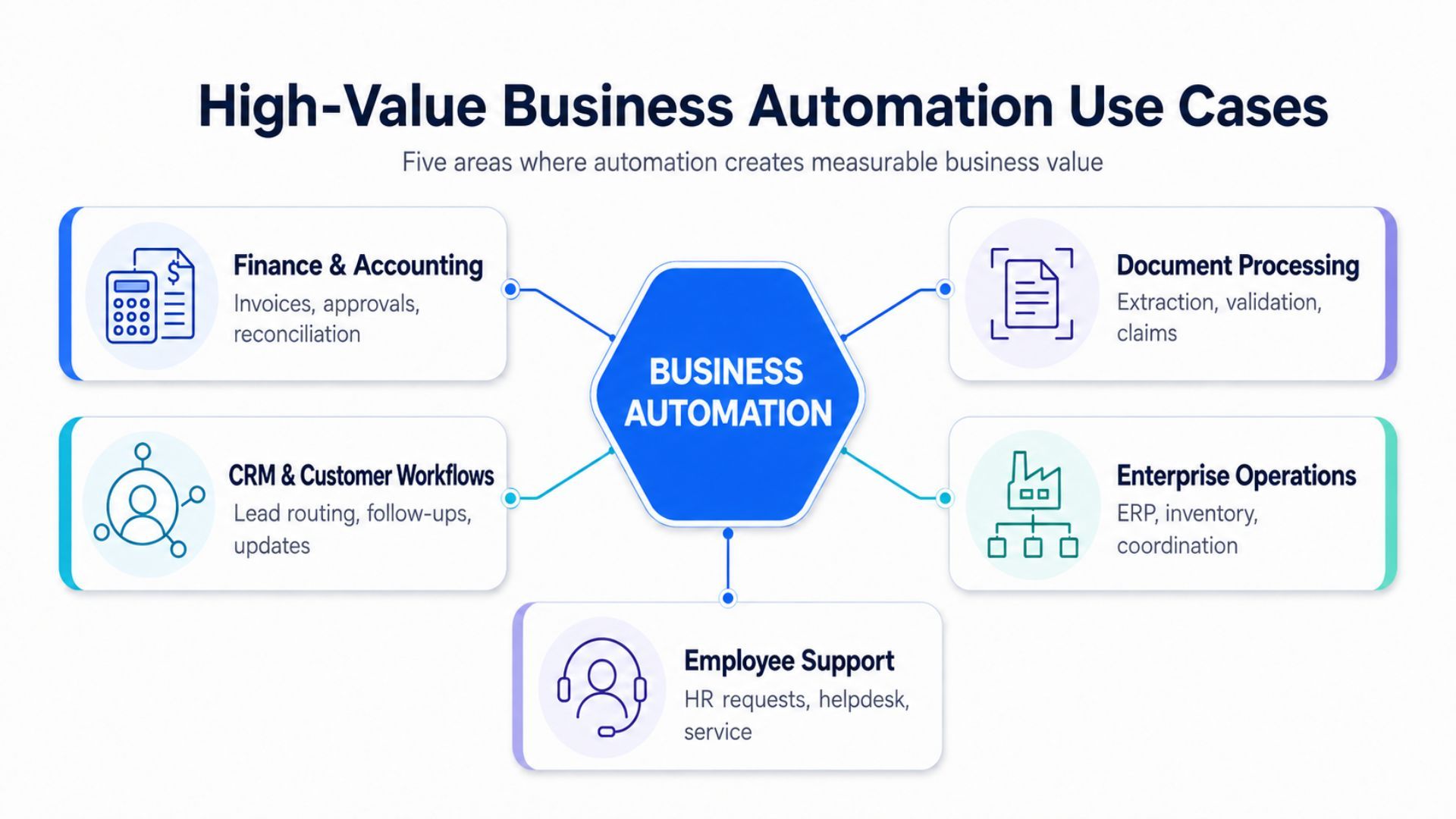
Finance and Accounting Automation
Finance teams often spend considerable time matching payments, validating invoices, preparing journal entries, and requesting approvals. These workflows become especially difficult when information is distributed across enterprise resource planning systems, spreadsheets, and shared inboxes.
According to Microsoft’s EY customer story, EY reduced general-ledger lead times by 95% through one application and saved approximately 120,000 hours annually through its payment-clearing solution. These figures describe separate processes within EY’s implementation, not an expected industry-wide result.
The practical lesson is to measure each workflow independently. Faster journal entries, fewer rebookings, and improved payment visibility create different forms of value and should not be combined without a clear measurement methodology.
Document and Claims Processing
Invoices, claims, contracts, and supporting documents frequently arrive in inconsistent formats. Employees may need to extract information manually, validate fields, translate content, and transfer records into operational systems.
Volvo Group’s Microsoft customer story describes an AI-supported document-processing solution that saved more than 10,000 manual hours after implementation. The project began with a six-week pilot before moving into production.
This example demonstrates why targeted pilots matter. Document extraction should be tested against real formats, confidence thresholds, validation requirements, and exception scenarios before being expanded across departments.
CRM and Customer Workflow Automation
Sales and customer teams benefit from workflows that route leads, schedule follow-ups, update customer records, and trigger relevant communications. Automation becomes more useful when these activities remain connected across CRM, marketing, and communication systems.
In a SaaS CRM automation and cloud modernization project, Titan Technology helped introduce automated marketing schedules, customer-pipeline workflows, reminders, and improved synchronization.
Although the published case does not disclose a quantified ROI, it illustrates how business workflow automation becomes more effective when product functionality, integrations, and infrastructure evolve together.
Enterprise Operations and Cross-System Coordination
Enterprise workflow automation often spans finance, sales, inventory, and customer management. The challenge is not simply replacing manual work. It is maintaining consistent information and operational visibility across multiple locations and systems.
Titan Technology’s TTTM enterprise resource planning case study describes a business system covering human resources, accounting, sales, CRM, inventory, and pricing. The implementation synchronized information between headquarters and branch locations while preserving local responsiveness.
At a larger scale, Microsoft reports that Uber achieved annual savings exceeding 300,000 hours and $9 million across automated business processes. Those are company-specific reported outcomes, not a general benchmark.
Employee Support and Internal Service Workflows
Internal service teams repeatedly answer policy questions, retrieve records, check invoice statuses, and route requests to the appropriate department. AI-assisted workflows can improve access to information while preserving approval requirements for consequential actions.
SOCAR Türkiye’s Microsoft customer story reports up to 50% faster responses in internal helpdesk and HR workflows and a 30% reduction in time spent on certain manual finance tasks.
Importantly, adoption depended on department-specific agents, digital champions, and ongoing optimization. The case reinforces that employee engagement and operational ownership matter as much as the technology itself.
How to Identify the Right Processes to Automate
Start with processes that combine meaningful operational impact with manageable implementation complexity. Evaluate each candidate against seven questions:
How frequently does the process occur?
How much time do employees spend completing it manually?
How often do errors, delays, or rework occur?
Are the steps and decision rules reasonably consistent?
Is the required data accessible and reliable?
Can the relevant systems exchange information securely?
What happens if an automated decision is wrong?
A high-volume approval workflow with standardized inputs is usually a stronger starting point than an unpredictable process involving sensitive judgments and incomplete records.
Assign each opportunity a simple impact-and-feasibility score. Prioritize workflows where teams can establish a baseline, launch a contained pilot, and verify outcomes without introducing unacceptable operational risk.
For example, a recurring invoice-approval bottleneck may deserve priority when teams already know its transaction volume, approval delays, and exception rate. A complex customer decision with inconsistent inputs may require process redesign and better data before automation is appropriate.
How to Build a Business Automation Implementation Strategy
Successful business process automation depends on disciplined execution, not simply purchasing software.
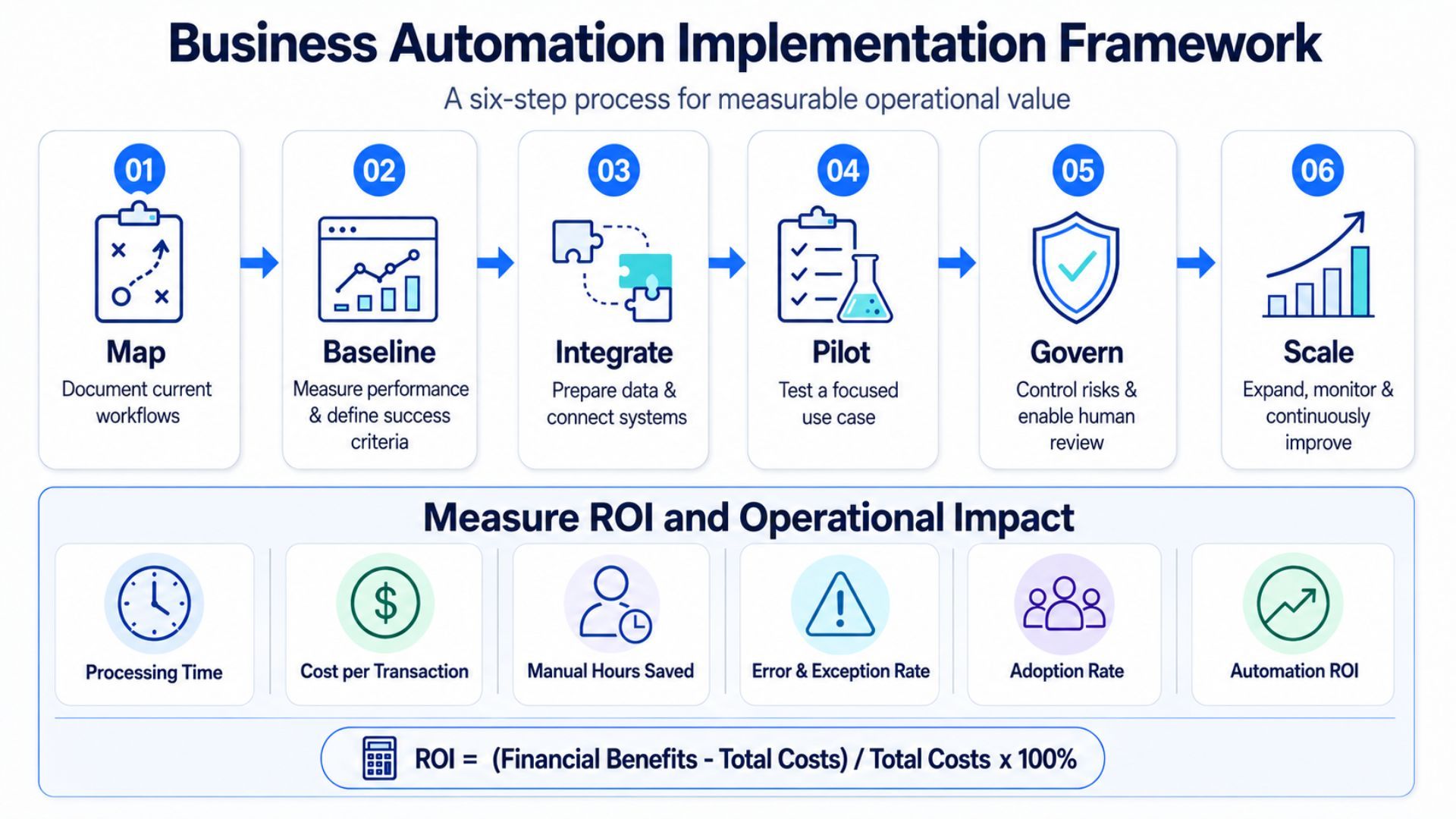
1. Map the Current Workflow
Document every handoff, data source, approval step, exception, and responsible team. Speak with the employees performing the work rather than relying exclusively on process diagrams. Informal workarounds often reveal why the current process breaks down.
2. Define Baselines and Success Criteria
Measure current processing time, transaction volume, error rates, backlog, and cost. Define what improvement would justify implementation. Without an agreed baseline, reported efficiency gains remain difficult to validate.
3. Prepare Data and Integrations
Identify where information originates, which systems own it, and how applications exchange updates. Determine whether APIs, integration middleware, custom connectors, or limited RPA are appropriate. Strong data engineering capabilities help prevent disconnected automations from creating new inconsistencies.
4. Launch a Focused Pilot
Select one workflow, one accountable owner, and a limited user group. Test realistic exceptions, security permissions, and rollback procedures. A successful pilot should demonstrate both technical reliability and business acceptance.
Agree on the pilot’s exit criteria in advance. These might include a target processing time, an acceptable exception rate, verified approval controls, and confirmation that employees can complete the revised workflow without additional manual workarounds.
5. Establish Governance and Human Review
Define approval thresholds, access permissions, audit requirements, and escalation paths before expanding the workflow. AI-generated classifications or recommendations should remain reviewable when mistakes could affect customers, finances, or compliance.
6. Scale and Improve Continuously
Expand only after the pilot meets agreed performance and risk criteria. Reuse integration patterns, document ownership, and review process changes regularly. Automation requires ongoing maintenance as business rules, applications, and organizational needs evolve.
How to Measure Business Automation ROI
Automation ROI should compare verified operational benefits against the full cost of implementation and continued operation.
Automation ROI = (Financial benefits − Total automation costs) / Total automation costs × 100%
Potential benefits include reduced processing effort, avoided rework, lower external service costs, increased transaction capacity, and faster completion of revenue-sensitive activities. Costs include software licenses, implementation, integration, security controls, training, maintenance, and monitoring.
Consider a clearly illustrative example. If a company verifies $120,000 in annual financial benefits and incurs $80,000 in implementation and first-year operating costs, its first-year ROI is 50%. This is a calculation example, not a projected result or customer case.
Track supporting indicators alongside financial return:
Measure processing time per transaction.
Monitor manual hours saved and how that capacity is redeployed.
Track error rates, rework, and exception volumes.
Compare cost per transaction before and after implementation.
Review service-level compliance and completion rates.
Assess employee adoption and workflow reliability.
Hours saved do not automatically become cash savings. Their financial value depends on whether the organization reduces external costs, absorbs additional demand, avoids hiring, or redirects employees toward higher-value work.
Separate one-time implementation expenses from recurring operating costs, and avoid counting the same benefit twice. For example, time released by an employee should not be treated as both direct payroll savings and additional delivery capacity unless each financial impact can be independently demonstrated.
Choosing Between Automation Software, Custom Solutions, and Hybrid Delivery
Business automation tools vary widely in flexibility, integration depth, and operating cost. The right model depends on whether existing workflows fit standard software or require custom orchestration.
Approach | Best suited for | Main trade-off |
Off-the-shelf software | Standard approvals, common integrations, and faster initial deployment. | Limited flexibility when workflows or governance requirements become more complex. |
Custom automation | Proprietary processes, legacy integration, specialized interfaces, and detailed control requirements. | Greater engineering, maintenance, and implementation responsibility. |
Hybrid architecture | Organizations combining established platforms with custom integrations or specialized workflows. | Requires clear ownership across software, integrations, and custom components. |
Evaluate workflow automation solutions against integration requirements, security boundaries, data ownership, auditability, scalability, and total cost of ownership. A low initial subscription fee can still produce higher long-term costs if employees must maintain manual workarounds or duplicate information.
Also consider platform dependency and future portability. An approach that works for one department may become difficult to scale if every additional workflow requires proprietary connectors, duplicate licenses, or specialized configurations that only one team understands.
Automation Risks, Governance, and Human Oversight
Automation changes how operational decisions are executed, so risk controls should be part of the architecture rather than a later addition.
Key safeguards include role-based access, approval thresholds, secure handling of sensitive information, exception monitoring, and audit logs. Organizations should also define who can modify automation rules and how changes are tested before deployment.
AI workflow automation introduces additional concerns. Document extraction can misread information, recommendations can be inaccurate, and connected tools can trigger inappropriate actions if permissions are too broad. Human review remains particularly important for payment approvals, employee records, regulated information, and customer-impacting decisions.
Change management matters as well. Employees need to understand how automated processes work, when to intervene, and where to report unexpected behavior. Adoption improves when teams can see how automation supports their work rather than simply being told to use a new system.
Establish a clear response when a workflow fails. Teams should know who can pause the automation, restore a manual process, investigate the issue, and approve a controlled return to production.
What Business Automation Looks Like in 2026
The direction of business automation is not simply replacing more tasks with AI. It is coordinating people, applications, data, and decision controls across complete workflows.
McKinsey’s research on automation and work estimates that existing technologies could theoretically automate activities representing approximately 57% of US working hours. However, technical potential is not a forecast of actual adoption. Implementation costs, workforce considerations, regulation, and operational readiness determine what organizations can deploy responsibly.
For enterprise leaders, the practical priority is selecting workflows where automation improves measurable outcomes while preserving accountability. AI is valuable when it helps process unstructured information or support employees, not when it adds complexity without a defined business purpose.
Turn Business Automation Into Measurable Operational Value
Business automation delivers sustainable value when organizations start with real operational problems, select appropriate technologies, and measure outcomes against a credible baseline. Effective initiatives connect process design, system integration, governance, and ongoing improvement.
Whether the priority is finance operations, CRM workflows, enterprise coordination, or AI-assisted document processing, the strongest approach begins with a focused use case and expands only after results are verified.
Explore Titan Technology Corporation’s business automation solutions, or contact our team to discuss your operational requirements.