

Summary for Decision-Makers
Web application development in 2026 is no longer limited to building browser-based software. For business and technology leaders, it is a way to modernize workflows, connect systems, improve customer experiences, and create scalable digital products without requiring users to install desktop or mobile software.
This guide explains what web application development means, how web applications differ from websites, which types of web apps businesses commonly build, and how to approach the development process step by step. It also covers current best practices in architecture, security, accessibility, performance, AI-assisted development, and partner selection.
Use this guide if you are planning a customer portal, internal business system, SaaS platform, e-commerce application, logistics dashboard, healthcare application, or finance workflow platform.

Web Application Development in 2026: Quick Answer
Web application development is the process of designing, building, testing, deploying, and maintaining software that runs in a web browser. Unlike a static website, a web application allows users to log in, submit data, complete transactions, manage workflows, generate reports, and interact with business systems in real time.
For businesses, web application development is commonly used to build customer portals, SaaS platforms, booking systems, e-commerce platforms, internal dashboards, workflow automation tools, and data-driven enterprise applications.
A modern web application usually includes three core layers:
- Front end: the user interface that people interact with in the browser.
- Back end: the business logic, APIs, authentication, and system workflows.
- Database and infrastructure: the data layer, cloud hosting, monitoring, security, and integrations.
What Is Web Application Development?
Web application development is the process of designing, building, and deploying software applications that run entirely in a web browser and are accessible from any device with an internet connection. Unlike traditional desktop software, which requires local installation, web applications are hosted on secure remote servers and delivered instantly via the internet.
A well-built web application is highly interactive, enabling users to input data, perform transactions, collaborate in real time, and access services without the need for additional software. Common examples include e-commerce platforms, online banking portals, project management tools, and cloud-based CRM systems.
What distinguishes custom web application development is its ability to align every feature, workflow, and integration with specific business objectives. From a secure document management platform for a law firm to a high-performance analytics dashboard for a logistics provider, custom web apps deliver the flexibility, scalability, and digital transformation impact that modern enterprises demand.
Web Application vs Website: Key Differences for Businesses
Although the terms “web application” and “website” are often used interchangeably, they serve very different purposes. Both are accessed through a browser, but their functionality, complexity, and user experience vary significantly.
Criteria | Website | Web Application |
Primary Goal | Share information, build online presence, brand awareness | Solve specific business problems, enable transactions, and streamline workflows |
User Interaction Level | Minimal; mostly reading or viewing content | High; supports data entry, transactions, and two-way communication |
Content Type | Mostly static or occasionally updated | Fully dynamic, generated based on user input and business logic |
Complexity | Low to moderate; limited features | High; multiple integrated features, role-based access, complex logic |
Technology Stack | Basic HTML, CSS, and simple JavaScript | Front-end frameworks and back-end technologies such as React, Node.js, .NET, and Java |
Performance Optimization | Focuses on page speed, caching, CDN delivery, and image optimization | Also requires API optimization, database indexing, load balancing, and application-level caching |
Security | Basic SSL/TLS encryption | Enterprise-grade security with authentication, authorization, encryption, and threat monitoring |
Data Handling | Limited form submissions or downloads | Real-time CRUD operations, database transactions, and API integrations |
Maintenance & Updates | Content changes require CMS or manual edits | Continuous integration and deployment (CI/CD) pipelines support frequent, centralized application updates |
Scalability | Can scale efficiently for content delivery through CDN and managed hosting | Must scale application services, databases, APIs, and infrastructure according to workload |
Personalization | Minimal; same content for all visitors | Custom dashboards, personalized feeds, and adaptive interfaces |
Integration Capability | Commonly integrates with analytics, CRM forms, chat, and content tools | Supports deeper integration with ERP, CRM, payment gateways, APIs, and operational systems |
Examples | Portfolio websites, news portals, landing pages | Online banking, e-commerce platforms, SaaS productivity tools |
The practical difference is this: a website mainly informs, while a web application helps users complete tasks. If your business only needs to publish content, a website may be enough. If users need to log in, manage data, make payments, track orders, approve requests, or collaborate inside a system, a web application is the more suitable choice.
Why Businesses Choose Web Applications Over Websites
In industries such as finance, healthcare, logistics, and e-commerce, organizations are moving from static websites to interactive web applications because:
Higher ROI through automation: Tasks that once required manual processing (e.g., approving transactions, scheduling shipments) can now be completed instantly within a web app.
Personalized user experiences: Apps can tailor content, dashboards, and workflows to specific roles or customer profiles.
Seamless integration with other systems: APIs allow web apps to connect with ERP, CRM, and analytics platforms for better decision-making.
Scalability: Built on cloud infrastructure, web apps can handle growth in traffic and data without major redevelopment.
How Web Applications Work
At its foundation, web application development relies on a client–server architecture that enables fast, secure, and interactive user experiences.
When a user interacts with the app via a browser by clicking a button, submitting a form, or accessing a dashboard, their request is sent to a web server, processed by an application server, and connected to a database where data is stored or retrieved. The response is then delivered back to the browser in real time.
Here’s a simplified breakdown:
Database Layer: Stores application data securely, often on cloud platforms like AWS RDS, Azure SQL, or MongoDB Atlas.
Modern custom web application development often integrates APIs, cloud hosting, and security layers. These can include SSL/TLS encryption, authentication mechanisms, and firewalls to support reliable and secure operation.
For a deeper technical reference, you can explore MDN Web Docs on the client-server overview. This is a trusted resource for developers worldwide and offers a clear explanation of how browsers, servers, and databases communicate.
Benefits of Web Application Development
Investing in web application development brings advantages that go beyond having an online presence. Modern web apps are designed to improve business performance, enhance customer experiences, and provide the flexibility to adapt to changing market demands.
1. Accessibility Across Devices
A single web application can serve users on desktop, tablet, and mobile without separate development for each platform. This “write once, run anywhere” capability reduces maintenance costs and shortens deployment time.
Example: A responsive appointment booking application can make it easier for patients to schedule and manage appointments across desktop, tablet, and mobile devices.
2. Cost and Time Efficiency
Compared to native mobile applications, web apps can be developed and deployed faster. Custom web application development allows businesses to focus on essential features first, then iterate based on user feedback.
According to McKinsey, cloud-native technologies and ways of working can accelerate product development, improve development productivity, and help businesses bring new capabilities to market faster.
3. Easy Maintenance and Continuous Updates
Core business logic and shared application data are typically managed centrally, allowing updates to be deployed consistently without requiring users to install a new software version.
Example: In finance, a real-time compliance dashboard can be updated centrally to reflect new regulatory requirements, without requiring manual updates on individual user devices.
4. Enhanced Security and Compliance
Web applications can implement enterprise-grade security measures such as end-to-end encryption, multi-factor authentication, and real-time threat monitoring.
5. Scalability for Growth
Cloud-native web applications can scale resources automatically to meet spikes in demand without infrastructure overhauls.
Example: An e-commerce platform can increase computing capacity during peak sales periods and scale resources back when demand returns to normal.
6. Advanced Analytics and Insights
Unlike static websites, web apps can integrate advanced analytics to capture user behavior, transaction data, and performance metrics in real time.
Example: An e-commerce company can use integrated analytics to identify checkout drop-off points, test improvements, and optimize the purchase journey.
These benefits illustrate why more businesses are moving beyond purely informational websites toward custom web application development, not only to improve user experience but also to deliver measurable operational impact.
Types of Web Applications
Understanding the different types of web applications is essential for selecting the right approach to meet your business goals. Each type offers distinct capabilities, performance profiles, and development considerations.
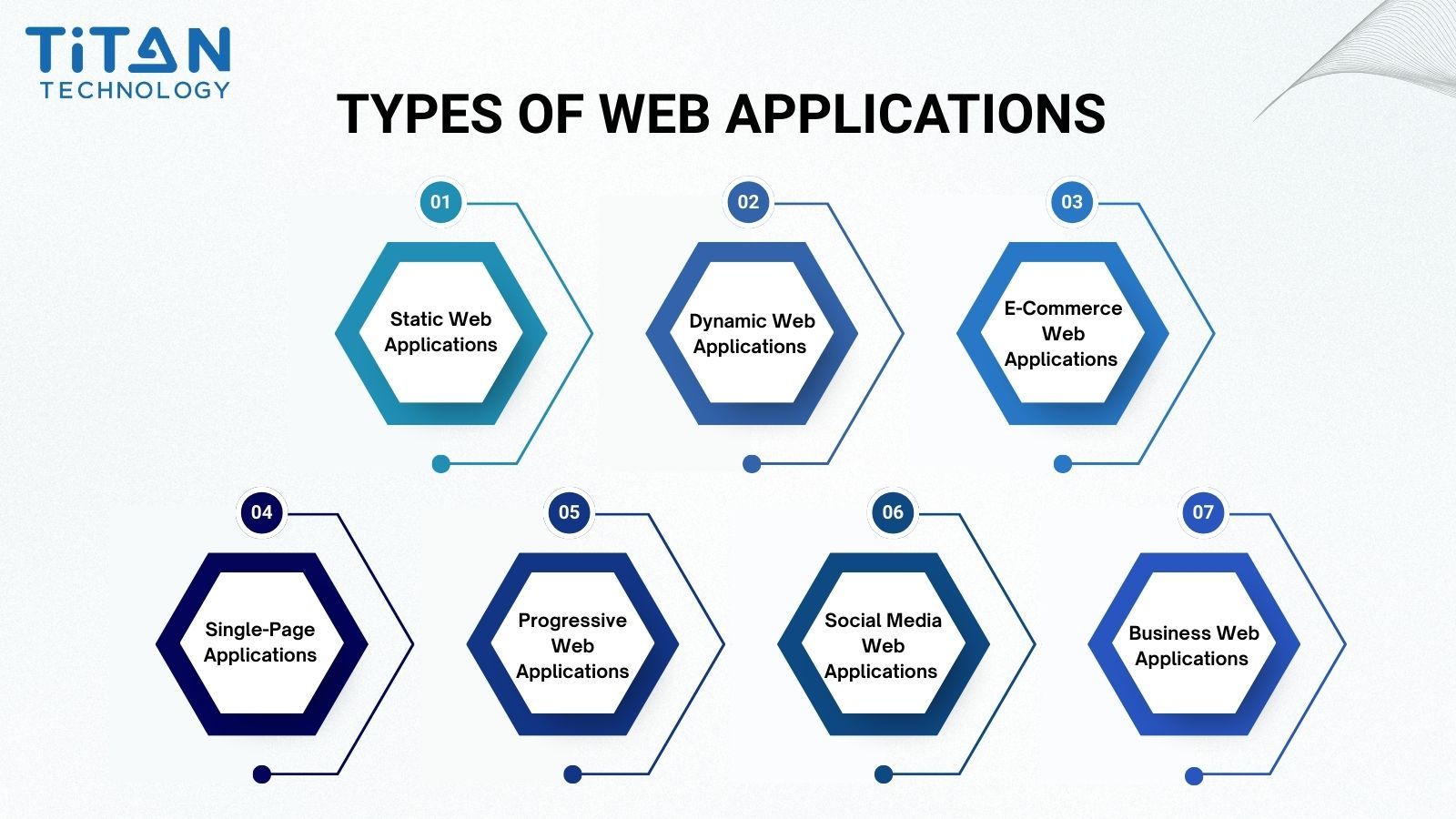
1. Static Web Applications
Static web applications are the simplest form of web presence and, technically speaking, are closer to static websites than full applications. They are built using a combination of HTML, CSS, and basic JavaScript to present fixed content to users. Since there is no server-side processing, every user sees the same information until a developer manually updates the files on the server.
While static web apps load very quickly and are inexpensive to host, they offer minimal interactivity and lack the ability to process real-time data. They are best suited for portfolios, marketing landing pages, or company information sites where the content changes infrequently.
For example, a small design studio might use a static web app to showcase its work without investing in a complex backend system.
2. Dynamic Web Applications
Dynamic web applications deliver content that changes in real time based on user actions, preferences, or system events. They rely on server-side technologies such as Node.js, PHP, or Python to process requests and generate custom responses.
These apps can personalize the user experience by pulling data from databases, displaying tailored recommendations, or allowing content submission. For instance, an online news portal can dynamically update headlines for different regions or languages. While more engaging than static apps, dynamic apps require regular maintenance, robust security measures, and a capable hosting environment to handle higher computational demands.
3. E-Commerce Web Applications
E-commerce web applications are purpose-built for online buying and selling, offering features like product browsing, shopping carts, secure payment gateways, and order tracking. They often integrate with inventory management, shipping APIs, and CRM systems to streamline operations.
Popular platforms like Amazon and Shopify use e-commerce web apps to deliver a seamless end-to-end shopping experience. The biggest advantages are their revenue generation potential and scalability, but they require strict compliance with standards such as PCI DSS to protect payment data. A well-designed e-commerce app can handle thousands of transactions per second during peak sales events.
4. Single-Page Applications (SPAs)
SPAs load a single HTML page and dynamically update its content as the user interacts with the app, eliminating the need for full page reloads. Built with frameworks such as React, Angular, or Vue.js, SPAs deliver a smooth, app-like experience in the browser.
Applications like Gmail or Trello are well-known SPAs, offering real-time updates and instant navigation between views. However, SPAs can pose SEO challenges if not configured with server-side rendering, and their initial load time may be longer due to downloading the entire app’s resources upfront.
5. Progressive Web Applications (PWAs)
Progressive Web Applications blend the broad reach of the web with capabilities commonly associated with native applications. Depending on browser and device support, they can be installed, provide offline experiences, send push notifications, and remain usable under slow or unreliable network conditions.
According to web.dev’s PWA guidance, users who install a PWA often demonstrate stronger engagement than typical visitors, including more repeat visits, longer time on site, and higher conversion rates. However, actual results depend on application quality, user needs, performance, and implementation.
Starbucks’ PWA is a real-life example. It was designed to provide a fast, app-like ordering experience, allowing customers to browse the menu, customize products, and continue using key features under unreliable network conditions. Because PWA feature availability can vary across browsers and operating systems, teams should verify compatibility with the devices used by their target audience.
6. Social Media Web Applications
Social media apps are built for large-scale interaction and user-generated content. They allow users to create profiles, share updates, comment, and engage in real-time communication. Platforms like Facebook, LinkedIn, and Twitter handle massive amounts of data and concurrent users.
These apps require sophisticated backend architectures to manage high traffic loads, ensure data privacy, and moderate content effectively. While they can foster strong community engagement, they also demand ongoing investment in infrastructure, security, and moderation tools.
7. Business Web Applications
Business web applications are custom-built to support specific internal processes such as HR management, project tracking, or business analytics. They are often integrated with enterprise systems like ERP or CRM to centralize operations.
For example, a logistics company might deploy a custom order management system that tracks shipments in real time, generates compliance reports, and predicts delivery delays using AI analytics. These apps deliver high operational value but require deep collaboration between developers and stakeholders to align with business workflows.
Choosing the Right Type: Match the app type to your target audience, growth plans, and technical resources. If you are unsure which option fits your strategy, consider exploring Titan’s consultation services for tailored advice.
Web Application Development for Industries
Web application development requirements vary by industry because each sector has different workflows, data sensitivity, compliance obligations, and integration needs. A successful solution should therefore be designed around the organization’s operating environment, user roles, and business outcomes rather than built from a generic feature list.
Industry | Common web application use cases | Key development priorities |
Finance and Fintech | Digital onboarding, transaction dashboards, approval workflows, customer portals | Security, audit trails, role-based access, system integration |
Healthcare and MedTech | Patient portals, appointment systems, telehealth workflows, operational dashboards | Privacy, accessibility, reliable identity and access management |
Logistics and Supply Chain | Shipment tracking, warehouse coordination, partner portals, route dashboards | Real-time data, scalability, mobile responsiveness, API integration |
Retail and E-Commerce | Product management, customer accounts, checkout, loyalty platforms | Performance, payment security, conversion, traffic scalability |
Education and E-Learning | Learning portals, assessments, progress tracking, administration | Accessibility, video performance, multi-device support, user management |
Real-Life Case: Retail Performance
Rakuten 24 measured the business impact of improving Core Web Vitals through an A/B test. Its optimized landing page delivered a 33.13% increase in conversion rate, a 53.37% increase in revenue per visitor, and a 35.12% reduction in exit rate. The case demonstrates why web performance should be treated as a commercial requirement, not only a technical metric.
Real-Life Case: Logistics Visibility
Recurso Confiable modernized its logistics SaaS platform to support real-time shipment visibility and higher transaction volumes. According to Google Cloud, the company tracked seven times more shipments, achieved 99% platform availability, and reduced rejected deliveries by 3% through automation. The case highlights the importance of scalable infrastructure, analytics, and real-time alerts in logistics web applications.
Industry-specific web application development requires more than changing the interface. Architecture, security controls, integrations, performance targets, and maintenance plans should reflect how each industry operates.
The Web Application Development Process: Step-by-Step Guide for 2026
At Titan, we follow a proven, structured process for web application development that balances technical precision with measurable business value. Each stage is designed to minimize risks, maximize performance, and ensure the final product is aligned with your long-term goals.
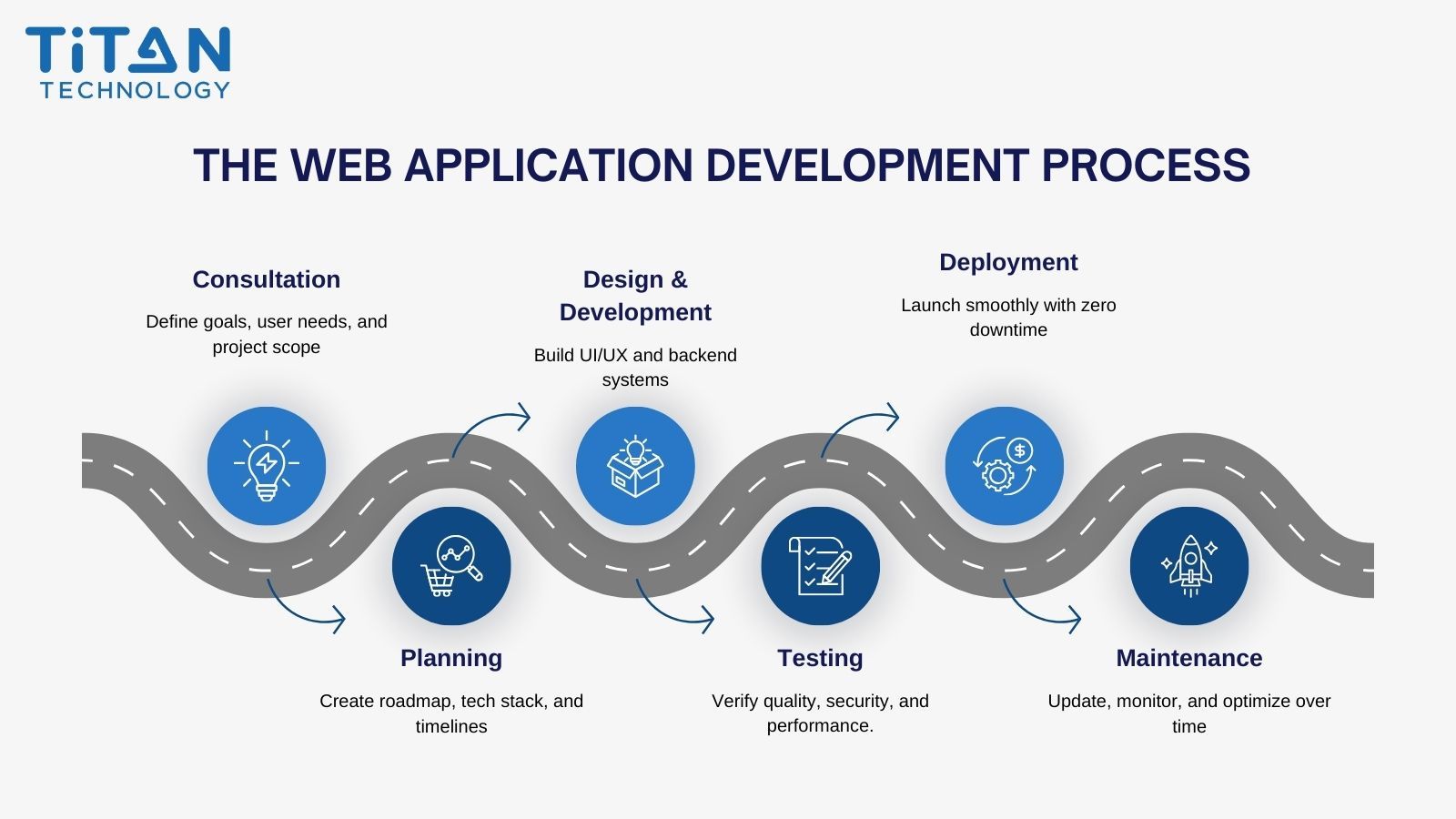
Step 1: Consultation
Every successful custom web application development project starts with a deep understanding of your business objectives, target users, and technical environment. We work closely with your team to define the project scope, clarify requirements, and map out how a web application can address operational challenges or open new revenue opportunities.
Example: For a logistics business, the consultation stage may reveal that real-time shipment tracking could reduce manual status requests, improve shipment visibility, and help teams respond to delivery exceptions more efficiently.
Step 2: Outline Features and Requirements
Once goals are aligned, we translate the vision into a detailed roadmap. This includes defining timelines, technical specifications, and resource allocation. Our team selects the right architecture, technology stack, and scalability strategy to ensure your web application meets current demands and adapts seamlessly to future growth.
Why it matters: Solid planning helps reduce the risk of scope creep, budget overruns, and delivery delays.
Step 3: Design & Development
Our UI/UX designers create intuitive, responsive interfaces that offer a consistent experience across devices. Then, our developers bring the vision to life by writing clean, maintainable code and building the backend infrastructure that ensures performance, reliability, and flexibility.
We follow modern frameworks and best practices so your application remains easy to update and secure over time.
Step 4: Testing
Before launch, we run comprehensive testing cycles to verify that the web application meets the agreed functional, security, performance, and compatibility requirements. This includes:
Functionality testing to ensure features work as intended.
Compatibility testing across browsers and devices.
Security testing to safeguard against vulnerabilities.
Performance testing to handle real-world load scenarios.
This proactive approach reduces launch risks and increases confidence in go-live readiness.
Step 5: Deployment
We handle deployment to your chosen environment - cloud, on-premise, or hybrid - with minimal disruption to operations. Our team ensures all configurations are in place, documentation is complete, and your internal teams are fully briefed to manage the system post-launch.
Step 6: Maintenance
Our partnership doesn’t end at launch. We continue to support your application with regular updates, performance monitoring, and quick fixes. Whether it’s adapting to new business requirements or scaling for increased traffic, our long-term maintenance ensures your web application remains secure, efficient, and aligned with your evolving goals.
Web Application Development Best Practices in 2026
A strong web application is not only functional. It should be secure, scalable, maintainable, and aligned with real business workflows. Before development begins, businesses should define the standards that guide architecture, UX, security, testing, and post-launch improvement.
The recommendations below are informed by established guidance on web performance, accessibility, web application security risks, and secure software development practices. These resources provide recognized guidance for building web experiences that are faster, more accessible, and more secure throughout the software development lifecycle.
1. Build Around Real Business Workflows
Start with user roles, approval flows, reporting needs, and integration points. This helps the application support daily operations instead of becoming another disconnected tool.
2. Design for Both Mobile and Desktop Users
Business users often switch between laptops, tablets, and mobile devices. Responsive design should be planned from the beginning to ensure a consistent experience across screen sizes.
3. Use API-First Architecture for Integration
API-first development makes it easier to connect the web application with CRM, ERP, payment gateways, analytics platforms, AI services, and third-party systems.
4. Apply Security by Design
Security should be considered from the planning stage, not only before launch. Authentication, authorization, encryption, input validation, logging, and access control should be built into the application architecture.
5. Test Before and After Launch
Testing should cover functionality, performance, compatibility, security, and user acceptance. After launch, monitoring and feedback help the team improve the application continuously.
6. Plan for Long-Term Maintainability
Clean code, documentation, modular architecture, version control, and regular updates make the application easier to improve as business requirements change.
Trends in Web Application Development 2026
The landscape of web application development in 2026 is shaped by emerging technologies, evolving user expectations, and a heightened focus on security and performance. Staying ahead of these trends helps businesses future-proof their investments.
1. Progressive Web Applications (PWAs)
Progressive Web Applications (PWAs) remain relevant in 2026 for businesses that need app-like web experiences without requiring users to download a native application. According to web.dev, users who install a PWA often demonstrate stronger engagement than typical visitors, including more repeat visits, longer time on site, and higher conversion rates.
However, results depend on application quality, user needs, performance, and browser support. Businesses should evaluate whether features such as installation, offline access, notifications, and reliable performance under unstable network conditions are relevant to their target users.
2. AI-Powered Development
Artificial intelligence is changing how development teams build and optimize web applications. AI-assisted tools can support requirements analysis, code generation, testing, documentation, debugging, and maintenance, while machine learning can enable more adaptive and personalized user experiences.
According to Gartner’s Top Strategic Technology Trends for 2026, AI-native development platforms are enabling small, agile teams to build software with generative AI more quickly, flexibly, and with growing enterprise readiness. However, human oversight remains essential for architecture decisions, security, code quality, and business-critical workflows.
3. WebAssembly (Wasm)
WebAssembly is enabling resource-intensive applications such as 3D modeling, real-time video editing, and large-scale data visualization to run in the browser with near-native performance.
By allowing code written in languages like C++ or Rust to execute directly in the browser, Wasm removes the traditional limitations of JavaScript-heavy applications. Tools like Figma use WebAssembly to provide a fast, desktop-level design experience entirely online, proving that complex creative work no longer needs to be tied to installed software.
4. API-First Development
An API-first approach ensures that applications are modular, integration-ready, and easy to scale. Combined with microservices architecture, it allows teams to deploy features independently, reducing downtime and improving agility.
Netflix uses continuous delivery practices across an AWS environment comprising hundreds of microservices and thousands of deployments each day. This case illustrates how independently deployable services and automated delivery can support frequent releases at scale.
5. Serverless Architectures
Serverless architecture frees developers from managing infrastructure, allowing them to focus solely on application logic. Resources automatically scale based on demand, making this model cost-effective and performance-friendly.
The Statista forecast shows that the global serverless computing market will reach $36.8 billion by 2028. E-commerce platforms often rely on serverless setups to handle massive traffic surges during events like Black Friday without expensive overprovisioning.
6. Accessibility-First Design
In 2026, accessibility is no longer optional. Applications designed with WCAG 2.2 guidelines from the outset help provide more equitable access for users, including people with disabilities. Accessibility-first design not only supports applicable accessibility and compliance requirements but also expands the potential audience and can improve search visibility.
7. Micro-Frontends
Breaking the front end into smaller, independently deployable modules known as micro-frontends allows different teams to work in parallel and release updates faster. This approach improves maintainability and scalability, especially in large, complex applications.
Security Challenges in Web Application Development
Security is one of the most critical aspects of web application development. Modern web apps process sensitive customer data, integrate with multiple systems, and are exposed to the internet, making them a prime target for cyberattacks. According to the Verizon Data Breach Investigations Report, 31% of breaches now begin with the exploitation of software vulnerabilities. This reinforces the need to integrate secure development, vulnerability management, and regular testing into the web application lifecycle.
1. Injection Attacks
Injection flaws, such as SQL injection or Cross-Site Scripting (XSS), occur when untrusted data is sent to an interpreter as part of a command or query. This can allow attackers to read, modify, or delete sensitive information.
Best Practice: Validate and sanitize all inputs, use parameterized queries, and adopt frameworks that provide built-in protection. See OWASP Injection Prevention Cheat Sheet.
2. Broken Authentication
Weak authentication mechanisms can allow attackers to compromise user accounts. This includes poor password policies, a lack of multi-factor authentication (MFA), and insecure session management.
Best Practice: Implement MFA, enforce strong password policies, and use secure session handling.
3. API Vulnerabilities
APIs are the backbone of modern custom web application development, but insecure endpoints can become entry points for attackers.
Best Practice: Use authentication tokens, rate limiting, and API gateways; regularly test APIs for vulnerabilities.
4. Sensitive Data Exposure
Data breaches often occur when sensitive data, such as personal identifiers or payment details, is stored or transmitted without proper encryption.
Best Practice: Use modern encryption standards like TLS 1.3, encrypt data at rest, and follow the NIST Secure Software Development Framework.
5. Cross-Site Request Forgery (CSRF)
CSRF tricks authenticated users into submitting requests they did not intend to make, potentially leading to unauthorized actions.
Best Practice: Use anti-CSRF tokens, same-site cookie settings, and verify the origin of requests.
6. Dependency Risks
Modern applications often rely on third-party libraries and frameworks, but outdated or compromised dependencies can introduce vulnerabilities.
Example: The 2021 Log4Shell vulnerability in Apache Log4j affected a widely used Java logging component and triggered urgent patching across many organizations and software products.
Best Practice: Maintain a software bill of materials (SBOM), regularly update dependencies, and scan for known vulnerabilities.
By proactively addressing these challenges, businesses can significantly reduce the risk of breaches, protect customer trust, and comply with industry regulations. Our web application delivery practices are supported by ISO 27001:2022-aligned information security controls and secure development practices. Security activities, including vulnerability assessment and penetration testing, are planned according to each project’s scope, risk profile, and requirements.
How to Choose the Right Web Application Development Partner
Choosing the right partner for web application development can determine whether your project meets deadlines, stays within budget, and delivers long-term value. The right team will bring both technical expertise and a deep understanding of your industry.
If you are comparing potential vendors, explore our guide to Custom Web App Development Services: 9 Criteria for Choosing a Scalable Partner. It provides a practical framework for evaluating scalability, security, quality assurance, integrations, delivery transparency, and long-term product support.
Key Criteria to Evaluate:
Proven Track Record: Review case studies, client testimonials, and portfolio examples. Look for partners who have delivered custom web application development projects similar to your requirements.
Technical Expertise: Ensure the team is skilled in relevant frameworks, programming languages, and emerging technologies such as AI integration, cloud-native development, and API-first architectures.
Security and Compliance: Your partner should follow recognized security standards such as ISO 27001 and be familiar with regulations like GDPR or HIPAA if your industry requires compliance.
Agile and Transparent Process: An agile development methodology with clear communication channels ensures that you are involved at every stage. Transparency in timelines, costs, and deliverables is key to avoiding surprises.
Post-Launch Support: A reliable partner will offer ongoing maintenance, performance monitoring, and feature upgrades to keep your application secure and competitive.
Cultural and Communication Fit: Smooth collaboration often depends on time zone alignment, language proficiency, and cultural compatibility — factors that are critical for long-term partnerships.
Working with a trusted outsourcing provider like Titan offers flexibility, access to a global talent pool, and proven delivery processes. For example, we’ve helped enterprises in finance, logistics, and healthcare build secure, scalable web applications that meet industry-specific compliance standards.
Conclusion & Call to Action
In 2026, web application development has evolved into a strategic enabler for businesses aiming to stay competitive in a fast-changing digital landscape. From custom web application development that solves unique operational challenges to leveraging emerging trends like AI, PWAs, and serverless architectures, the right approach can transform efficiency, security, and user engagement.
Whether you are at the early research stage or ready to launch a mission-critical project, the key to success lies in selecting a development partner who understands both the technical and business dimensions of your vision. At Titan, we bring together proven expertise, global delivery capabilities, and a commitment to security and transparency, with the goal of helping each project deliver measurable business value.
If you are ready to explore how a tailored web application can support your growth, contact our team today to schedule a free consultation. Let’s build something that not only works for today but scales for tomorrow.